| Concept | What it means here |
|---|---|
| Missing clump | Restore original pixels if the boundary is clear |
| Pale fringe | Inspect on a dark background before changing softness |
| Translucent strands | May need specialist matting or a better capture |
Separate the visible failure types
Hair can fail as a broad shape, as individual strands or as a color fringe. The broad silhouette may be easy to restore with a brush. A strand mixed with the original background is harder because its color and coverage are entangled. Treating every problem as an overly sharp edge can lead to excessive softness without actually improving the selection.
Use the original photograph as the reference. An automatic model can omit flyaway hair or keep a region of similarly colored background. Decide what belongs to the person before painting. The goal is to preserve the person’s actual appearance, not to create a smoother hairstyle simply because it is easier to cut out.
Worked example: the curly-hair sample
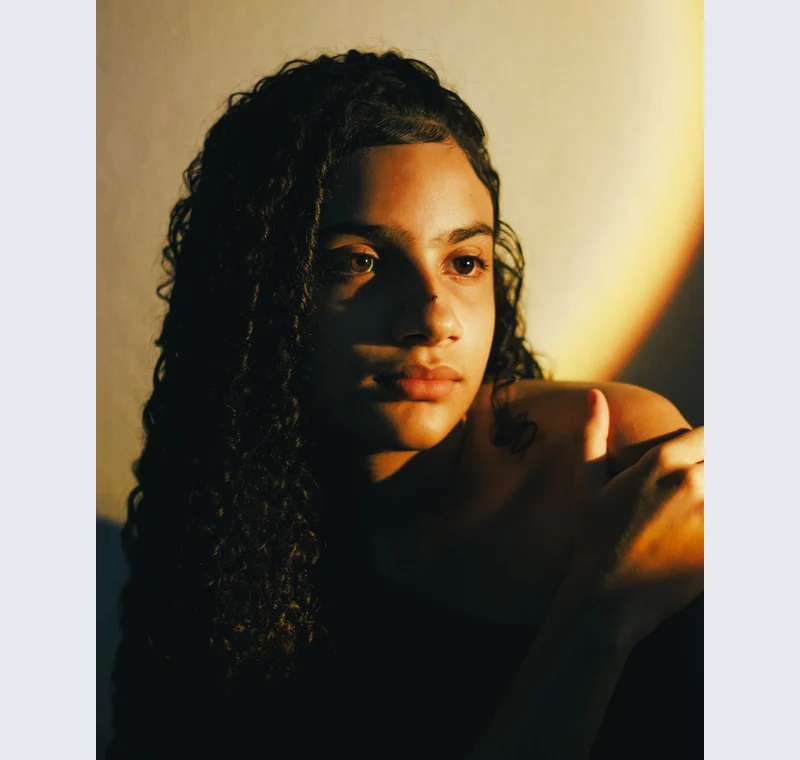
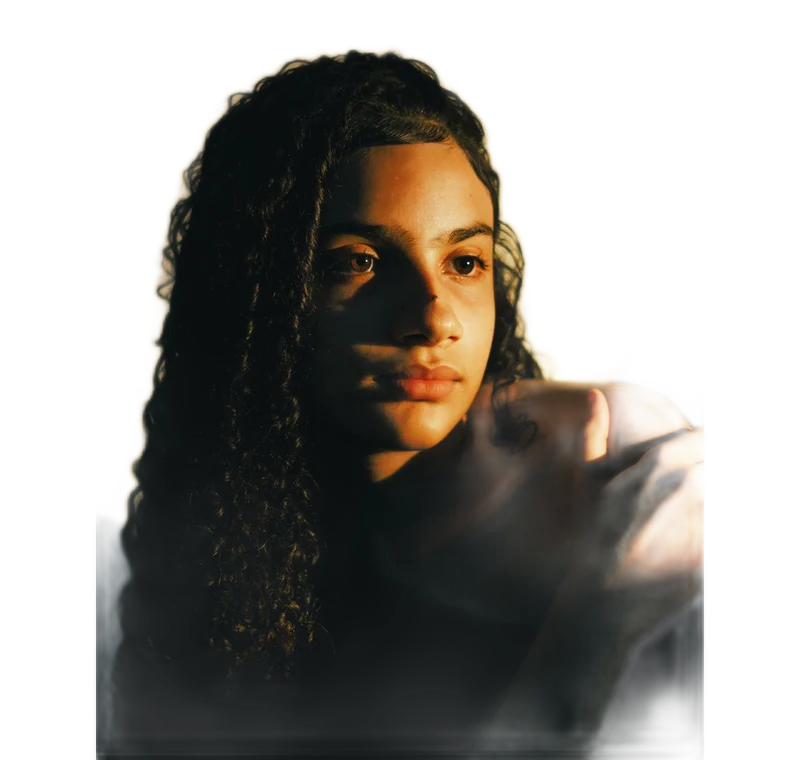
Open the hair example and inspect the exported result shown on our model-evaluation page. The broad hair shape separates, while fine boundaries need review. Try placing the result on a darker color. Areas that were inconspicuous on a pale checkerboard can become more obvious. This is a qualitative inspection of that sample, not an accuracy score for all curly hair.
In the studio, use a small brush for a local omission and preserve the original surrounding texture. If restoring the strand also restores too much backdrop, undo and reconsider the source or destination background. Repeated broad strokes can replace a useful partial mask with a blunt edge. Work locally and compare after each meaningful correction.
Understand what softness changes
Softness broadens the transition around the existing mask. It does not distinguish a strand from a similarly colored wall and does not reconstruct a foreground color contaminated by the old background. It can help a harsh boundary, but it can also make the person look translucent at the edge. Inspect at the publishing scale as well as close up.
If a fringe persists, a background with less contrast may conceal it, but that is a composition choice rather than a repaired matte. For a critical portrait, retaking the source with better subject-background separation or using a dedicated matting workflow can be more appropriate. The MODNet paper is a useful reference for why portrait matting is a distinct task.
Export an honest result
Keep a transparent master and test it on the destination color. Avoid judging only from the checkerboard. When the image is for an official identity process, follow the authority’s rules instead of assuming that a natural-looking edit is allowed. Many identity workflows require an unaltered source.
Save the original alongside the edited copy. A later destination may reveal an edge that the current background hides. Returning to the original preserves a route to another mask or a different crop, while repeated processing of an already softened edge can make diagnosis harder.
Put this method into practice: open the relevant local image tool →. Keep your original and inspect the exported copy.
Questions that come up
Can the brush reconstruct invisible strands?
No. It can restore original pixels where they exist, but it cannot identify an exact foreground contribution that the source does not clearly separate.
Should every hair edge be soft?
No. Some boundaries are sharp in the original. Match the source and intended display rather than applying the same softness everywhere.
Is the example proof of accuracy on all hair?
No. It shows an actual result on a licensed sample with qualitative limitations. No general success percentage is claimed.
Sources & method
Last checked: . Official rules can change. Calculated presets are identified separately.
- Actual model evaluation. Backdropless. Checked 2026-10-29.
- u2netp ONNX model card. edgetools / Hugging Face. Checked 2026-10-29.
- Is a Green Screen Really Necessary for Real-Time Portrait Matting?. Zhanghan Ke et al.. Checked 2026-10-29.
- Published tool specifications. Backdropless. Checked 2026-10-29.